ERP Data Migration: How to Plan Data Quality, Scope and Go-Live
Key Takeaways
- ERP data migration is not a technical task to leave until the end of an implementation. It is one of the conditions for a stable go-live.
- A new ERP system does not automatically improve data quality. More often, it exposes problems that were manageable in the legacy environment.
- Master data, open transactions, inventory, balances and financial assignments need to be reliable before the new ERP can plan, post, deliver or report correctly.
- Not every historical record belongs in the new system. Migration scope should explicitly distinguish between data to migrate, cleanse, archive or leave behind.
- ERP migration rarely involves only one legacy system and one target system. Connected applications and transition scenarios need to be included from the start.
- ETL, ELT, staging and validation matter because they make the migration traceable, repeatable and testable.
- IT can move data. The business still has to decide whether that data is correct.
Why ERP Data Migration Is Often Underestimated
ERP projects naturally attract attention to the new system.
What functionality does it provide? How well does it support the company’s processes? Which modules will be implemented? What will the project cost? When can the organisation go live?
Data migration looks less dramatic.
Export the information from the old system, clean it up, import it into the new one and check whether everything arrived.
That description hides most of the actual work.
A new ERP does not start with an empty database. It inherits customers, suppliers, products, materials, accounts, open orders, inventory, balances, bills of material, project structures and service information from an existing system landscape.
Much of that data has accumulated over years.
Records have been entered manually, changed several times, copied between systems, maintained in spreadsheets or supplemented through workarounds that were never formally documented.
As long as the legacy ERP is running, many of these weaknesses remain manageable.
Employees know which customer record is the correct one. Missing information is clarified by phone. Ambiguous material numbers are understood because experienced colleagues know the history behind them. Duplicate suppliers remain in the system because somebody knows which record should actually be used.
That informal knowledge does not migrate automatically.
Imagine a company implementing a new ERP to improve material planning. During the first realistic migration test, the project team discovers that minimum stock levels are incomplete, supplier lead times have not been maintained and material groups have been used inconsistently.
The planning engine is not the problem.
It simply cannot produce useful results from unreliable inputs.
The same applies to finance. If open items, balances, cost centres or account assignments are migrated incorrectly, the impact appears immediately in closing, dunning, reporting and day-to-day accounting.
Data migration is therefore not merely a technical work package before go-live.
It is a test of how well the organisation actually understands its own data.
Which information is reliable?
What does the target ERP require?
Which legacy structures still serve a purpose?
Which problems should deliberately stay behind?
And who is authorised to decide whether a record is correct?
The wider digitalisation picture suggests why this becomes difficult. KfW Research reports weakening digitalisation activity among German SMEs: only 30% of companies recently implemented digitalisation projects, while spending has also declined [1].
Figures published by maximal.digital point to a related data challenge. Although 82% of the SMEs surveyed consider data analysis strategically important, 75% have no systematic data strategy, 68% struggle with data silos and 58% have not established functioning data-governance structures [7].
ERP migration is often where those weaknesses become visible.
A system can only plan, post and report reliably if the underlying information is usable.
What ERP Data Migration Actually Means
ERP data migration is the structured transfer of relevant business data from existing systems into a new ERP environment.
The word transfer can be misleading.
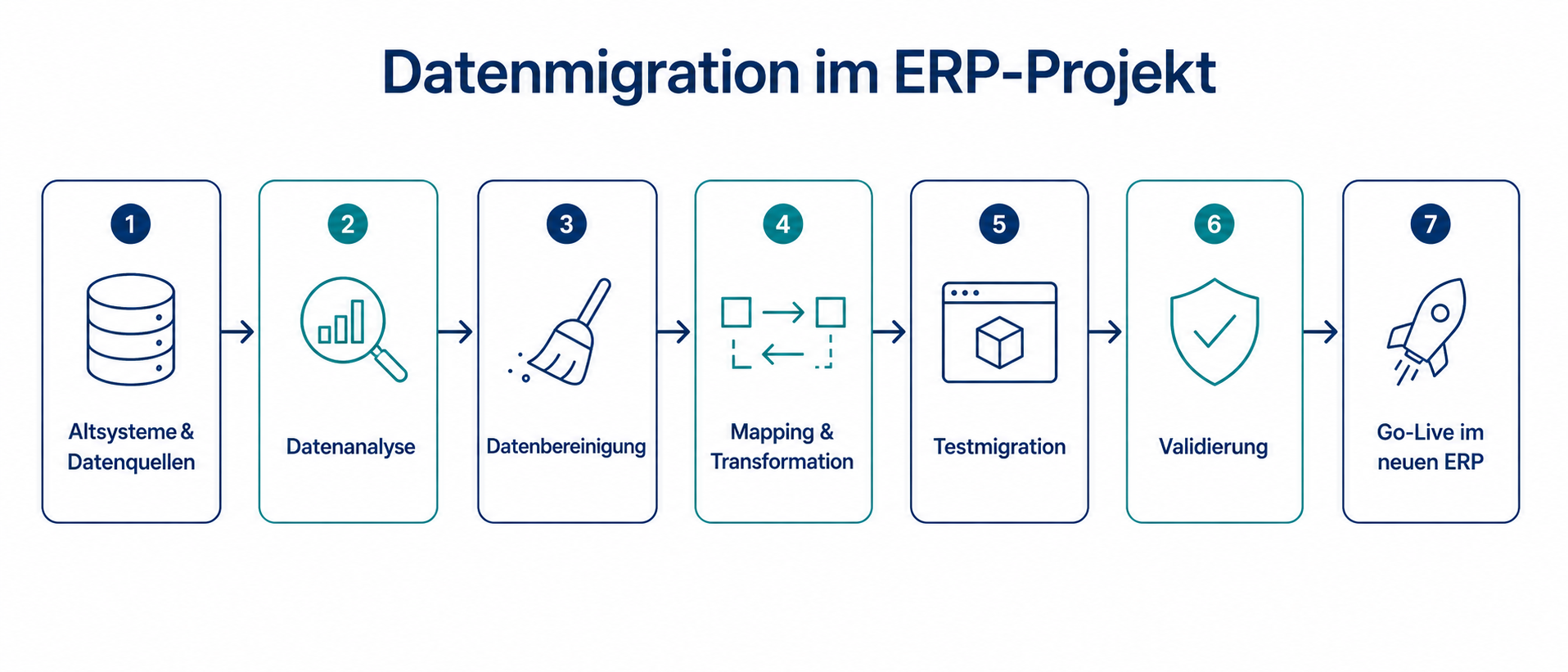
The process usually involves selecting data, extracting it, cleansing it, transforming it, validating it and finally loading an approved dataset into the target system.
Three concepts are worth separating.
Data migration is normally a project activity. It has a defined scope, a target environment, test cycles and usually a cutover date.
Data integration describes the ongoing exchange of information between systems. A CRM sends customer data to ERP. An online shop receives inventory information. A BI platform receives financial transactions.
Data replication creates a continuously updated copy of information in another environment.
These activities may interact, but they solve different problems.
A new API does not automatically solve migration. And migration does not remove the need for future integrations.
The same applies to spreadsheets.
For a small and clearly defined dataset, exporting data, correcting it manually and loading an import template may be sufficient.
For business-critical ERP data, that approach becomes difficult to control.
Changes are hard to trace. Validation rules are inconsistent. Manual corrections accumulate. Test migrations cannot easily be reproduced.
The objective is therefore not that data somehow arrives in the new system.
It needs to arrive complete, correct, consistent, traceable and approved by the business.
Which Data Should You Migrate?
Not all ERP data deserves the same treatment.
Some information is necessary for operations on day one. Other data mainly supports history, analysis or regulatory retention.
A sound migration starts by distinguishing between these categories before technical extraction begins.
Master Data
Master data underpins most ERP processes.
Typical examples include customers, suppliers, products, materials, accounts, cost centres, employees and fixed assets.
Errors spread quickly.
An incorrect supplier address affects purchasing. Incomplete material classifications weaken planning and reporting. Duplicate customer records can distort revenue analysis, open items, conditions and dunning.
Master data should therefore not simply be copied into the new environment.
It needs profiling, duplicate detection, cleansing and clear ownership.
Transactional Data
Transactional data results from business activity: quotations, sales orders, purchase orders, deliveries, invoices, postings, production orders and service cases.
The critical question is not whether these records can be moved.
It is whether they need to remain operational in the new ERP.
Open sales orders, active purchase orders and unfinished production orders usually do.
Transactions closed several years ago may not.
An archive or read-only environment can often preserve historical access without recreating every old transaction inside the operational ERP.
Open Items, Inventory and Balances
Open receivables and payables, inventory quantities and financial balances are particularly sensitive at cutover.
The project has to create an exact transition between the two systems.
Which customer and supplier items remain open?
Which quantities and inventory values will be transferred?
Which general-ledger balances apply at the cutover date?
Which work in progress or active projects continue in the new system?
Errors here tend to surface immediately.
Invoices cannot be completed. Inventory does not reconcile. Financial reports diverge. Existing transactions can no longer be processed correctly.
Historical Data
There is an understandable instinct to migrate as much history as possible.
It feels safer.
But full historical migration is not automatically the lower-risk choice.
Old documents, completed orders, inactive products and suppliers that have not been used for years all add work.
They still need mapping.
They still need transformation.
They still need validation.
The value of doing so may be limited.
Companies should decide which historical information genuinely needs to be available inside the operational ERP and which data can remain in an archive, BI environment or read-only legacy system.
Configuration Data
ERP environments also contain configuration data: payment terms, tax codes, company structures, plants, warehouse locations, approval logic, workflows and pricing rules.
Microsoft explicitly distinguishes between configuration data, which defines how the environment operates, and migration data such as customers, products or open transactions [5].
That distinction is useful beyond Microsoft Dynamics projects.
Configuration data may not be migrated one-to-one at all.
The new ERP may use a different structure.
It still has to be considered as part of the migration programme because migrated records only work if the surrounding configuration supports them.
A customer record without the correct payment terms, tax logic or account assignment is not ready for productive use.
The first migration question should therefore not be:
How do we move everything out of the old system?
It should be:
Which data does the new ERP actually need, at what quality level, by when and under whose ownership?
Data Quality Has to Improve Before Migration
A new ERP can introduce better data structures.
It can require fields that were optional before. It can enforce validation rules. It can support more disciplined processes.
What it cannot do is create data ownership automatically.
Duplicate customers remain duplicates.
Incorrect inventory remains incorrect.
An inconsistent material structure does not become consistent because the database has changed.
In many projects, the new ERP simply makes old weaknesses harder to ignore.
That is why data quality should be assessed well before the final migration cycle.
Discovering missing mandatory fields or unresolved duplicates shortly before go-live turns ordinary business decisions into urgent problems.
Which customer record survives?
Which product number remains?
Which historical transactions are still needed?
Which dataset is authoritative?
For ERP migration, six data-quality dimensions are particularly useful: completeness, accuracy, consistency, uniqueness, timeliness and validity. Similar dimensions are used by the Government Data Quality Framework and ISO/IEC 25012 [3, 4].
Completeness
Does every record contain the information the target process needs?
A new ERP may require tax IDs, IBANs, units of measure, planning attributes, product classifications or payment terms that were optional in the old system.
Missing information can block real processes.
A customer cannot be invoiced.
A product cannot be planned.
A purchase order cannot be generated.
Accuracy
A populated field can still be wrong.
An address may be outdated. A supplier may still be active even though it has not been used for years. A price can exist but no longer reflect the commercial reality.
Technical checks cannot resolve all of these questions.
The relevant business team has to determine whether the information is actually correct.
Consistency
ERP records depend on one another.
An order references a customer. Inventory references a material. A posting references an account or cost centre.
Breaking these relationships can create failures that are not immediately visible during import.
For example, a transaction may still point to a master-data record that was merged or removed during cleansing.
The load completes.
The process does not.
Uniqueness
Duplicates are particularly difficult because they often require business judgement.
Which customer record should survive?
Where should the transaction history go?
Which supplier number remains valid?
Which naming or numbering convention applies in the future?
Moving the duplicates first and fixing them later merely transfers the decision into the new system.
Timeliness
Existence is not a sufficient reason to migrate a record.
Inactive suppliers, discontinued products, obsolete cost centres and completed projects increase the scope without necessarily improving the new ERP.
The project needs to distinguish between operationally relevant data, information that has to be retained and data that can be archived.
Validity
Fields also need to comply with target-system rules.
IBANs, dates, tax numbers, email addresses, currencies and units of measure need valid formats.
Free-text conventions that worked in a legacy environment may fail against stricter validation rules.
This category is relatively easy to automate and should be tested early.
The goal is not perfect data.
It is a clear understanding of whether business-critical data is good enough to move.
Connected Systems Change the Migration Problem
ERP migration is often drawn as a simple arrow:
Legacy ERP → New ERP.
Most companies do not operate that way.
Their ERP connects to CRM, e-commerce, document management, BI, MES, WMS, HR applications, finance tools, spreadsheets and custom systems.
Some send data to the ERP.
Others receive information from it.
Some are being replaced as part of the project; others will remain.
Bitkom’s Data Economy study describes the wider difficulty companies have in turning existing data into usable business value [2]. In an ERP project, that often appears as information distributed across systems, formats and responsibilities.
This is why migration planning has to include the surrounding landscape.
Consider an online shop that will remain live while the ERP is replaced.
Which system owns product information after go-live?
Where are prices maintained?
Which system owns customer data?
How are inventory levels synchronised?
What happens to orders created immediately before cutover?
These are not merely interface questions.
They are ownership questions.
If nobody decides which system is authoritative, contradictory data follows quickly.
Sales sees one customer status while service sees another.
The shop offers stock that the ERP no longer considers available.
Reporting continues to read from the old environment while operations already use the new one.
The project therefore needs explicit answers for the transition:
- Which applications contain migration-relevant information?
- Which applications remain connected after go-live?
- Which system is authoritative during each migration phase?
- Which information moves once and which remains synchronised?
- Which reports and interfaces need to change?
- At what point must the legacy system become read-only?
This becomes especially important in phased migrations.
A new ERP can be technically live while the surrounding landscape still behaves as though nothing has changed.
Do Not Migrate Everything
A good migration is not the one that moves the most data.
It is the one that moves the right data.
Different stakeholders naturally see the scope differently.
Finance wants auditable balances.
Sales and service want customer history.
Management wants comparable reporting.
IT wants to reduce unnecessary complexity.
All of those needs are legitimate.
None of them automatically justify a complete migration.
Every additional dataset increases mapping, transformation, testing and validation.
For old completed transactions, that cost can exceed the value of keeping the information inside the operational ERP.
A practical migration scope distinguishes between four questions.
What Is Required on Day One?
Usually:
- active customers and suppliers,
- active materials and products,
- open sales and purchase orders,
- inventory,
- open receivables and payables,
- financial balances.
Without them, normal operations cannot continue.
What Has to Be Retained but Not Operated?
Old invoices, completed orders and historical postings may remain legally or commercially relevant.
They do not necessarily have to exist as active records in the new ERP.
Archive or read-only access may be sufficient.
What Is Needed for Reporting?
Historical information may still matter for revenue comparisons, product analysis or customer behaviour.
That does not automatically make the ERP the correct destination.
A BI or data platform may be better suited.
What Should Stay Behind?
Inactive products, duplicate customers, outdated price lists, unused suppliers and old workaround fields can all add complexity without adding value.
| Data Category | Typical Approach | Reason |
|---|---|---|
| Active customers and suppliers | Migrate | Required for ongoing operations |
| Active products and materials | Migrate | Needed for procurement, inventory, production and sales |
| Open sales and purchase orders | Migrate | Required for continuity |
| Inventory, open items and balances | Migrate | Critical for go-live |
| Old completed documents | Assess | Archive or read-only access may be enough |
| Inactive materials and suppliers | Migrate selectively | Avoid unnecessary complexity |
| Historical financial postings | Often archive or aggregate | Do not overload the operational ERP |
| Legacy custom fields | Review critically | Often represent old workarounds |
Not migrating a dataset does not mean deleting it.
It means making an explicit decision about where that information will live in the future.
Big Bang, Phased Migration or Parallel Operation?
Migration strategy determines how the organisation moves from old to new.
That choice affects business risk, downtime, interfaces, staffing, testing and training.
Three approaches are common.
Big Bang
A big-bang migration creates one clear transition point.
The legacy system is frozen, final data is migrated and the organisation starts operating in the new ERP.
The advantage is simplicity.
The transition period is short and duplicate maintenance is limited.
The disadvantage is concentration of risk.
If customer data is missing or opening balances are wrong, the problem affects the organisation immediately.
Big bang therefore requires mature testing, stable data, a detailed cutover plan and an organisation that can make decisions quickly.
Phased Migration
A phased migration introduces the target environment in waves.
The phases may follow locations, companies, processes, modules or data domains.
Problems are easier to contain.
The organisation can learn from one phase before starting the next.
The price is transition complexity.
Two system logics may coexist.
Interfaces become temporary.
Master-data ownership becomes more difficult.
Reporting may have to combine old and new structures.
The approach can reduce implementation risk, but only if the transition architecture itself is managed carefully.
Parallel Operation
Parallel operation keeps both systems running for a defined period.
Results can be compared and discrepancies investigated before the legacy system is retired.
That can provide additional confidence for sensitive processes.
It is also expensive.
Employees perform duplicate work.
Two system logics have to be understood.
Reporting and interfaces become more complicated.
There is another risk: the temporary safety net becomes permanent because nobody wants to approve the final switch-off.
Parallel operation therefore needs a clear end date and explicit exit criteria.
How Should You Choose?
There is no universally best migration strategy.
The decision depends on data quality, landscape complexity, organisational structure, resources and risk tolerance.
The important point is to choose early enough.
Migration strategy influences cleansing, testing, interface design and the entire cutover plan.
ETL, ELT and Staging: What Management Needs to Understand
Terms such as ETL, ELT, staging and mapping sound technical.
The underlying management principle is simple:
A migration needs to be repeatable and explainable.
Suppose data is exported, modified in spreadsheets and loaded through several templates.
An error appears.
Where did it happen?
Was the source already incorrect?
Did the export change a format?
Was the wrong transformation applied?
Did the import reject a record?
Did somebody fix it manually afterwards?
Without a controlled migration path, these questions become difficult to answer.
ETL: Transform Before Loading
ETL stands for Extract, Transform, Load.
Data is extracted, cleaned and transformed before being loaded into the operational system.
Typical transformations include:
- converting formats,
- mapping legacy numbers,
- harmonising product groups,
- completing mandatory fields,
- resolving duplicates.
The main advantage is control.
The target ERP receives data that has already passed through the defined transformation process.
The transformation rules still need documentation. Otherwise, the ETL process becomes its own black box.
ELT: Load Before Transforming
ELT stands for Extract, Load, Transform.
Raw information is first loaded into a data environment and transformed there.
Modern cloud and data platforms make this approach increasingly practical.
It can be useful when the migration also feeds analytics, reporting or archival environments.
Raw data remains available and transformations can often be versioned.
That does not mean uncontrolled raw data should be loaded directly into the operational ERP.
Access, ownership and validation remain necessary.
Hybrid Approaches
Many projects end up using both.
Critical cleansing happens before data reaches ERP.
Additional analytical transformations happen later in a data platform.
Whether a project calls this ETL or ELT is less important than the control questions:
Can you reproduce the migration?
Can you explain every transformation?
Can you trace an error?
Can you repeat the test?
Staging Areas
A staging area creates a controlled layer between source and target.
Raw data, cleansed data, transformations and validation results can be separated.
That makes errors easier to isolate.
It also allows the business to review the information before the final load.
For ERP projects, this matters because a migration error is rarely just a data error.
Incorrect inventory affects operations.
Incorrect customers affect sales.
Incorrect open items affect finance.
ERP Data Migration Best Practices
A reliable migration is built through several cycles of decisions, testing and validation.
SAP’s ERP migration guidance similarly highlights existing-data assessment, careful mapping, data governance and structured validation [6].
1. Start Data Profiling Early
Understand the existing data before migration design becomes fixed.
How many records exist?
Where are they stored?
Which fields are incomplete?
How many duplicates exist?
Which systems use conflicting formats?
Ideally, this starts before implementation and may already influence ERP selection.
The condition of the data affects project effort and risk.
If you are still evaluating the future ERP, an initial ERP matching can help structure the system-selection stage before migration design becomes fixed.
2. Prioritise Data Objects
Not every object has the same impact on go-live.
Business-critical master data usually comes first, followed by open transactions, inventory, balances and other operational data.
Historical and archival information can follow later.
The useful question is:
What absolutely has to work on the first productive day?
3. Freeze the Migration Scope
Define explicitly:
Which objects are migrated?
How much history?
What is archived?
What gets cleansed?
What stays behind?
Which legacy environments remain available for read-only access?
These decisions need owners.
Otherwise, migration scope tends to expand throughout the project.
4. Map the System Landscape
List the connected applications and the direction of their data flows.
ERP rarely exists alone.
Even a simple diagram showing CRM, shop, DMS, BI, MES, WMS and spreadsheet dependencies can expose migration risks that remain invisible in a pure ERP plan.
5. Assign Data Owners
Every important data domain needs a business owner.
Who decides which customer record survives?
Who determines whether a material is still active?
Who signs off balances?
Who approves the new cost-centre structure?
IT can test whether information is technically valid.
It should not be expected to decide whether the information is commercially correct.
6. Document the Mapping
Migration mapping explains how source data becomes target data.
A useful mapping records the source, target, transformation rule, mandatory fields, validation method and business owner.
Without that documentation, every later correction becomes harder.
7. Clean Before You Load
Do not postpone avoidable cleansing until after go-live.
Critical duplicates, obsolete records, missing required values and inconsistent assignments should be resolved before they become productive data in the new ERP.
8. Use Realistic Test Migrations
A few perfect records prove that the import mechanism works.
They do not prove that the migration works.
Test cycles should contain realistic volumes, edge cases, poor-quality records and old structures.
Expect several iterations.
The first test finds problems.
The next verifies corrections.
Later runs should become increasingly similar to the final cutover.
9. Define Validation Rules Before Testing
Decide in advance what proves that a migration succeeded.
Typical controls include:
- source and target record counts,
- balance and inventory reconciliation,
- mandatory-field checks,
- referential-integrity checks,
- business sampling,
- plausibility checks,
- exception reports.
The load finishing without an error is not a business acceptance criterion.
10. Define Go/No-Go Criteria for Cutover
The cutover plan should answer:
When is the legacy system frozen?
When is the final extract taken?
How long does the load take?
Who validates which domain?
Which discrepancies are acceptable?
When is the process stopped?
What is the fallback option?
Who has final authority to approve go-live?
A go-live decision should be based on agreed evidence rather than schedule pressure.
11. Require Business Sign-Off
Technically valid does not mean operationally correct.
A customer can exist with the wrong payment terms.
A material can exist without its planning parameters.
Totals can reconcile while individual assignments remain wrong.
Business validators need to test representative business scenarios, not merely confirm that rows exist in a table.
Data Migration Roles and Governance
ERP migration exposes an important distinction between technical and business responsibility.
Lünendonk reports that 72% of surveyed user companies aim to become more data-driven, while 69% report shortages of staff in Data & Analytics [8].
That creates a familiar project problem:
The organisation wants better data, but ownership is not adequately resourced.
| Role | Responsibility |
|---|---|
| Data Owner | Migration scope, business correctness and sign-off |
| IT / Migration Lead | Technical migration path, validation and error handling |
| Business Validator | Business plausibility and representative process tests |
| Project Manager | Timeline, risks, escalation and cutover |
| Steering Committee | Scope, risk and final go/no-go conflicts |
Smaller organisations do not need five separate people.
Roles can be combined.
Responsibility should not be implicit.
That is the distinction.
Prepare Migration Before It Becomes a Go-Live Problem
ERP data migration cannot be solved by one technical workshop shortly before cutover.
The most valuable preparation happens earlier.
Which data domains are critical?
Where is quality uncertain?
Which surrounding systems are affected?
Who owns each decision?
Which migration strategy fits the risk?
What will the organisation deliberately not move?
These are management questions as much as technical ones.
An external perspective can be useful when those questions have not yet been structured.
The goal is not necessarily to choose a migration tool.
It is to identify risk early enough to do something about it.
How Find-Your-ERP Can Help
Migration risk starts before implementation.
The target ERP determines its data model, required fields, available interfaces and much of the later migration effort.
A system may look attractive functionally and still create avoidable complexity if its data structures or integration model fit poorly with the company’s starting point.
That makes data readiness relevant during ERP selection as well.
If you are preparing an ERP replacement or implementation, it can be useful to review the data situation before migration decisions become time-critical.
Which data is likely to be migration-relevant?
Where are the main quality risks?
Which systems need to be considered?
Which questions should be resolved before vendor selection, implementation or cutover?
Prepare Your ERP Project Before Cutover Becomes Critical
Discuss your ERP project, system landscape and data situation with an independent expert.
Conclusion: Good ERP Data Migration Starts Long Before Go-Live
Data migration is not the final technical task in an ERP project.
It is one of the workstreams that determines whether the new system can operate reliably from day one.
A new ERP can improve processes and introduce better controls.
It cannot compensate for unresolved duplicates, missing ownership, incorrect balances or an unclear migration scope.
Good migration begins by deciding what the business actually needs.
It assesses quality.
It assigns ownership.
It documents transformations.
It rehearses the process.
And it establishes evidence for the go-live decision.
The most useful change in perspective is simple:
ERP data migration is not about reproducing the legacy system as completely as possible.
It is about creating a reliable data foundation for the processes the company intends to run next.
FAQ: ERP Data Migration
Deeper dive: Reliable migration starts with reliable master data. See ERP Master Data: How Data Quality Drives Automation and AI for why master-data quality is the real precondition for automation and AI in ERP.
FAQ
Ideally during project preparation or even ERP selection. Data volume, quality, system dependencies and historical scope all influence effort, risk and the implementation plan.
Current master data, open transactions, inventory, balances and open items are usually the highest priority. Historical information should be assessed separately. Some history may be better retained in an archive, reporting platform or read-only legacy environment.
ETL means Extract, Transform, Load: data is transformed before it enters the target environment. ELT means Extract, Load, Transform: raw information is loaded first and transformed afterwards. ERP projects often use elements of both approaches.
ERP processes depend directly on the information they receive. Incorrect customer, product, inventory, financial or transaction data can disrupt procurement, production, sales, finance and reporting immediately after go-live.
Neither approach is universally better. Big bang creates a clear cut but concentrates risk. Phased migration spreads risk but increases transition complexity. The right approach depends on data quality, system complexity, organisational structure and risk tolerance.
IT owns the technical migration process. Business teams need to own the business meaning and correctness of the information. Clear data owners and business validators are therefore essential.
Sources
[1] KfW Research. (2025). KfW-Digitalisierungsbericht Mittelstand 2025 [KfW digitalisation report for German SMEs 2025] (in German).
[2] Bitkom e. V. (2025). Data Economy: Studienbericht 2025 [Data Economy: 2025 study report] (in German).
[3] Government Data Quality Hub. (2021). Meet the data quality dimensions. GOV.UK.
[4] International Organization for Standardization. (2008). ISO/IEC 25012:2008: Software engineering — Software product quality requirements and evaluation (SQuaRE) — Data quality model. ISO.
[5] Microsoft. (2024). Manage configuration and migration data for Dynamics 365 implementation projects. Microsoft Learn.
[6] SAP. (2024). ERP migration checklist: Key strategies for success. SAP Resources.
[7] maximal.digital. (2025). Digitalisierungsstudie 2024/2025: Digitalisierung im Mittelstand und KMU 2025 – Einblicke und Impulse [Digitalisation study 2024/2025: digitalisation in the German Mittelstand and SMEs – insights and impulses] (in German).
[8] Lünendonk & Hossenfelder GmbH. (2024). Lünendonk-Studie 2024: Der Markt für IT-Dienstleistungen in Deutschland. [Lünendonk study 2024: the market for IT services in Germany] (in German).